> ## Documentation Index
> Fetch the complete documentation index at: https://docs.makemypass.com/llms.txt
> Use this file to discover all available pages before exploring further.
# Child Events
> Child events are sub-events created under a main event, allowing for better organization and management of multiple related events.
## Creating a Child Event
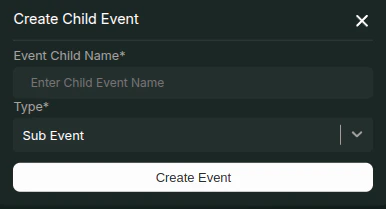 1. Click on the **Create Child Event** button at the top right.
2. In the modal that opens, enter the child event name and select its type:
* **Sub-Event**
* **Feedback Event**
3. Once created, the organizer is directed to the event page of the newly created sub-event.
4. The organizer can configure the sub-event just like the parent event.
## Guest Registration for Child Events
* Guests must be registered in the **main event** before registering for the sub-event.
* They must log in using the **email** they used for the parent event.
* Since they have already provided details such as name and email for the parent event, this information is automatically mapped to their child-event submission, eliminating the need to re-enter details.
1. Click on the **Create Child Event** button at the top right.
2. In the modal that opens, enter the child event name and select its type:
* **Sub-Event**
* **Feedback Event**
3. Once created, the organizer is directed to the event page of the newly created sub-event.
4. The organizer can configure the sub-event just like the parent event.
## Guest Registration for Child Events
* Guests must be registered in the **main event** before registering for the sub-event.
* They must log in using the **email** they used for the parent event.
* Since they have already provided details such as name and email for the parent event, this information is automatically mapped to their child-event submission, eliminating the need to re-enter details.