> ## Documentation Index
> Fetch the complete documentation index at: https://docs.makemypass.com/llms.txt
> Use this file to discover all available pages before exploring further.
# Advanced Ticket Settings
> Each ticket has additional settings that allow for greater customization and control over ticket sales and validity.
## Code Prefix
* You can manually update the event ticket **code prefix** (default: `MMP`).
* Each ticket code consists of the **prefix** followed by a set of **unique numbers**.
* You can define the **number of digits** in the unique code sequence.
## User Count
* Set the **number of users per ticket** who can check in with the same ticket.
## Category
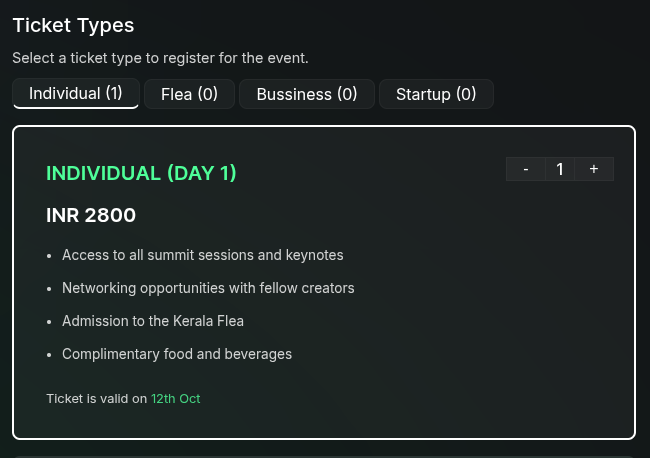
* Assign a **category** to a ticket (e.g., `Individual`, `Flea`, `Business`, etc.). This will be used for grouping the tickets in the ticket selection at the registration page.
 ## Commission
* Set a **commission amount** that can be given to the person who sells the ticket.
* This works in conjunction with the **Referral Code** field.
## Allowed Date
* If the ticket is valid only for a certain period, specify the **valid dates**.
* This is useful for events that have different ticket types for different days or sessions.
* Example: If a ticket is valid only for the first day of a two-day event, set the **valid date** to the first day.
## Ticket Sale Period
* **Start Date:** The date and time when ticket sales begin.
* **End Date:** The date and time when ticket sales close.
## Conditional Ticket Display
* Tickets can be shown or hidden based on **form field values** provided by the user.
* Example: If a ticket is available only for students but a user selects **Professional** in the form, the student ticket will be **hidden** from that user.
Use conditional display settings to personalize the ticketing experience based on user input.
## Commission
* Set a **commission amount** that can be given to the person who sells the ticket.
* This works in conjunction with the **Referral Code** field.
## Allowed Date
* If the ticket is valid only for a certain period, specify the **valid dates**.
* This is useful for events that have different ticket types for different days or sessions.
* Example: If a ticket is valid only for the first day of a two-day event, set the **valid date** to the first day.
## Ticket Sale Period
* **Start Date:** The date and time when ticket sales begin.
* **End Date:** The date and time when ticket sales close.
## Conditional Ticket Display
* Tickets can be shown or hidden based on **form field values** provided by the user.
* Example: If a ticket is available only for students but a user selects **Professional** in the form, the student ticket will be **hidden** from that user.
Use conditional display settings to personalize the ticketing experience based on user input.