> ## Documentation Index
> Fetch the complete documentation index at: https://docs.makemypass.com/llms.txt
> Use this file to discover all available pages before exploring further.
# Speakers Management
> For **events**, there may be multiple speakers. You can add speakers to your event so that the speaker list is displayed to attendees during registration.
## Adding a New Speaker
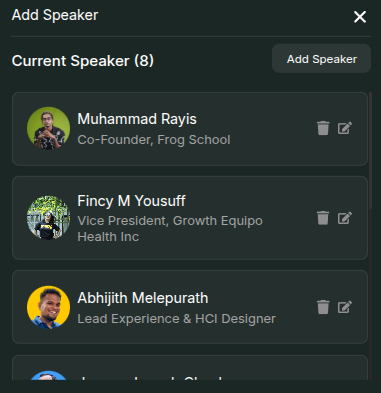 1. From the **Event Page**, select the **Update Speaker** button.
2. In the modal that opens, click the **Add Speaker** button in the top-right corner.
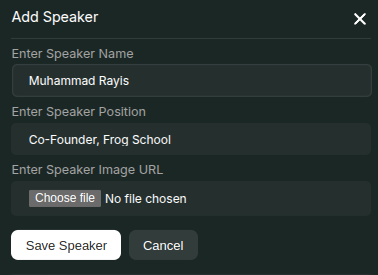
3. In the new modal that appears, enter:
* **Speaker Name**
* **Position**
* **Image**
4. Click **Save** to add the speaker.
Once added, the speaker will appear in the **Current Speakers** section.
This information will be displayed on the **Registration Page**.
## Editing or Deleting a Speaker
1. From the **Event Page**, select the **Update Speaker** button.
2. In the modal that opens, click the **Add Speaker** button in the top-right corner.
3. In the new modal that appears, enter:
* **Speaker Name**
* **Position**
* **Image**
4. Click **Save** to add the speaker.
Once added, the speaker will appear in the **Current Speakers** section.
This information will be displayed on the **Registration Page**.
## Editing or Deleting a Speaker
 * Similar to venue management, speaker details (**name, position, image**) can be **edited** or **removed** using the respective buttons next to each speaker.
* Click the **Edit** icon to modify the speaker's details.
* In the modal that opens, update the required fields.
* Click **Delete** to remove the speaker from the list.
* Confirm the deletion in the modal that appears.
* The updates will be reflected on the **Registration Page** instantly.
* Similar to venue management, speaker details (**name, position, image**) can be **edited** or **removed** using the respective buttons next to each speaker.
* Click the **Edit** icon to modify the speaker's details.
* In the modal that opens, update the required fields.
* Click **Delete** to remove the speaker from the list.
* Confirm the deletion in the modal that appears.
* The updates will be reflected on the **Registration Page** instantly.