> ## Documentation Index
> Fetch the complete documentation index at: https://docs.makemypass.com/llms.txt
> Use this file to discover all available pages before exploring further.
# Sponsors Management
> For **large-scale events**, sponsors play a crucial role. You can add a list of sponsors, categorized by **tiers**, to showcase them on the **Registration Page**.
## Adding a New Sponsor
 1. Click the **Update Sponsors** button on the event page.
2. In the modal that opens, click the **Add Sponsor** button in the top-right corner.
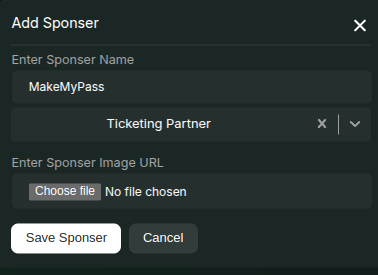
3. In the new modal, enter the following details:
* **Sponsor Name**
* **Create or Select a Sponsor Tier** (e.g., `Gold`, `Silver`, `Bronze`)
* **Upload an Image** for the sponsor logo
> **Note:** All sponsor details will be displayed on the **Registration Page**.
## Changing Sponsor Order
1. Click the **Update Sponsors** button on the event page.
2. In the modal that opens, click the **Add Sponsor** button in the top-right corner.
3. In the new modal, enter the following details:
* **Sponsor Name**
* **Create or Select a Sponsor Tier** (e.g., `Gold`, `Silver`, `Bronze`)
* **Upload an Image** for the sponsor logo
> **Note:** All sponsor details will be displayed on the **Registration Page**.
## Changing Sponsor Order
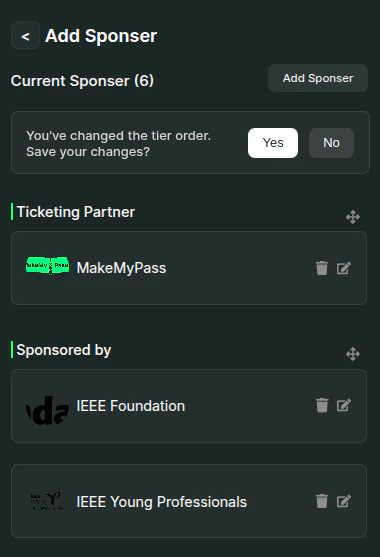 * Once all sponsors have been added, you can **rearrange** their order by dragging them within the **Add Sponsors** modal by using the against each tier name.
* Click **Yes** against the alert to confirm the new order.
* The sponsor list will be displayed in the same order **after the registration form** on the event page.
## Editing or Deleting an Existing Sponsor
* You can **edit** or **delete** a sponsor by using the respective **Edit** and **Delete** icons next to each sponsor in the listing section.
* Once all sponsors have been added, you can **rearrange** their order by dragging them within the **Add Sponsors** modal by using the against each tier name.
* Click **Yes** against the alert to confirm the new order.
* The sponsor list will be displayed in the same order **after the registration form** on the event page.
## Editing or Deleting an Existing Sponsor
* You can **edit** or **delete** a sponsor by using the respective **Edit** and **Delete** icons next to each sponsor in the listing section.