> ## Documentation Index
> Fetch the complete documentation index at: https://docs.makemypass.com/llms.txt
> Use this file to discover all available pages before exploring further.
# Venue Management
> For **offline events**, there may be multiple venues within the event itself. Each venue can have a **venue check-in** feature for tracking attendees. To enable this, you first need to add venues to the event.
## Adding a New Venue
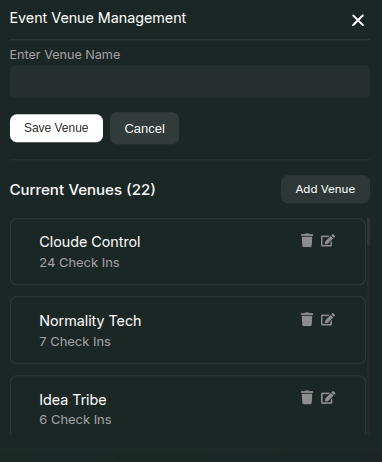 1. Click the **Update Venues** button on the event page.
2. In the modal that opens, click the **Add Venue** button in the top-right corner.
3. Enter the **Venue Name** in the input field and click **Save Venue**.
4. The newly added venue will now appear in the **Current Venues** list.
## Venue Check-in
1. Click the **Update Venues** button on the event page.
2. In the modal that opens, click the **Add Venue** button in the top-right corner.
3. Enter the **Venue Name** in the input field and click **Save Venue**.
4. The newly added venue will now appear in the **Current Venues** list.
## Venue Check-in
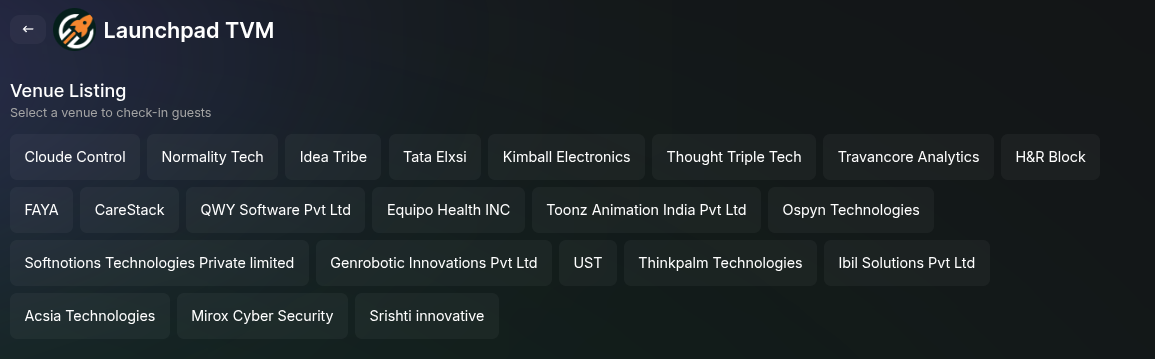 1. Once a venue is added, you can checkout the **Scan QR** section to see the button for venue checkin named **Venue Check-in**.
2. Clicking it will list the set of venues added to the event. **Select the venue** you want to check in.
3. Use the QR code scanner to check in attendees at the venue.
The venue check-in statistics will be available in the **Insights** section of the event dashboard.
## Editing or Deleting a Venue
* Once listed, you can **edit** or **delete** a venue by clicking the respective buttons next to it.
If a venue has active **check-in data** and you delete it, all associated data will be lost permanently.
Managing venues effectively ensures a smooth event experience. Use check-ins to track attendee movements across different locations.
1. Once a venue is added, you can checkout the **Scan QR** section to see the button for venue checkin named **Venue Check-in**.
2. Clicking it will list the set of venues added to the event. **Select the venue** you want to check in.
3. Use the QR code scanner to check in attendees at the venue.
The venue check-in statistics will be available in the **Insights** section of the event dashboard.
## Editing or Deleting a Venue
* Once listed, you can **edit** or **delete** a venue by clicking the respective buttons next to it.
If a venue has active **check-in data** and you delete it, all associated data will be lost permanently.
Managing venues effectively ensures a smooth event experience. Use check-ins to track attendee movements across different locations.