

Adding a New Sponsor
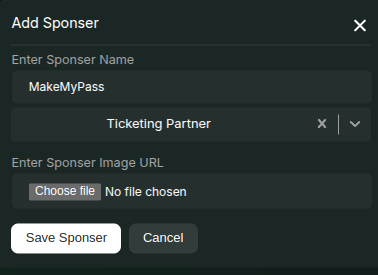
- Click the Update Sponsors button on the event page.
- In the modal that opens, click the Add Sponsor button in the top-right corner.
- In the new modal, enter the following details:
- Sponsor Name
- Create or Select a Sponsor Tier (e.g.,
Gold,Silver,Bronze) - Upload an Image for the sponsor logo
Note: All sponsor details will be displayed on the Registration Page.
Changing Sponsor Order
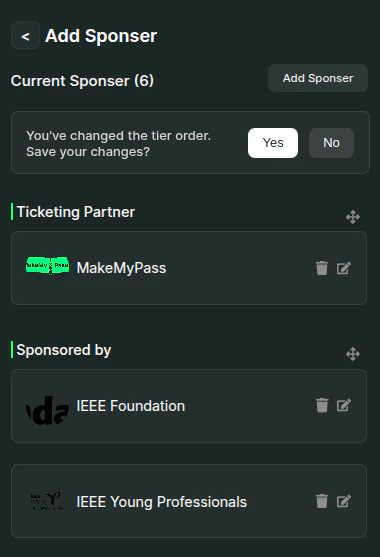
- Once all sponsors have been added, you can rearrange their order by dragging them within the Add Sponsors modal by using the against each tier name.
- Click Yes against the alert to confirm the new order.
- The sponsor list will be displayed in the same order after the registration form on the event page.
Editing or Deleting an Existing Sponsor
- You can edit or delete a sponsor by using the respective Edit and Delete icons next to each sponsor in the listing section.